Ask Hytrol: EZLogic® Zone Status Lights
Welcome to Ask Hytrol. Today, we’re going to talk about reading EZLogic® LED indicator lights to determine zone status. The first step when troubleshooting an error on any Hytrol EZLogic® model of conveyor is to determine whether or not it is an EZLogic® problem.
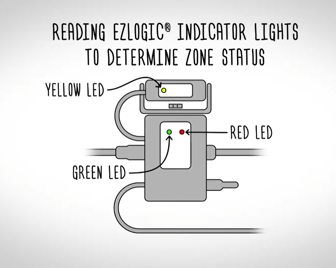
First, let’s recap what the LED indicator lights represent:
-
The yellow LED has two indicators: a steady on yellow LED means there is no object detected. A steady off-yellow LED indicates there is an object detected.
-
The green LED indicates the power. When the green LED is on, power is on. If the green LED is showing a fast flash, a jam has been detected. If the green LED is showing a quick flash on, the zone is in sleep mode.
-
The red LED tells us whether the zone should be driving or not. A steady on red LED indicates that the zone should be driving. A steady off red LED indicates the zone is stopped.
To determine whether a troubleshooting issue is an EZLogic® issue, you need to determine whether or not the zone status matches what the EZLogic® controller is representing. For example, if the zone is not driving, but should be, does EZLogic® show a steady red LED? If EZLogic® is showing an incorrect function, and that incorrect function is being repeated in the zone, EZLogic® is at fault. If EZLogic® is showing the correct function, but the zone is performing an incorrect function, EZLogic® may be set to the incorrect zone output mode.
Check the on-to-stop vs off-to-stop settings for your model. If the output mode is correct, then there is likely a mechanical issue. If you have determined it to be an EZLogic® issue, consult EZLogic® troubleshooting. If EZLogic® is not at fault, consult your conveyor model’s installation manual for mechanical troubleshooting information.
You should now be able to determine zone status by reading EZLogic® LED indicator lights. For more help troubleshooting other EZLogic® issues, contact Hytrol’s Customer Care team or your Hytrol solutions provider.