How to Use the Updated Hytrol Toolbox App
At Hytrol, we know how important it is to have quick, reliable access to information about your equipment. That’s why we’re excited to roll out some major updates to the Hytrol Toolbox app—a free tool built with maintenance teams and everyday users in mind.
So, what’s new?
We’ve completely rebuilt the app to make it easier to use, more intuitive, and even more helpful for everything from training to troubleshooting. Whether you’re in the shop, on the floor, or out in the field, the updated Toolbox is all about helping you work smarter.
Important to Note:
- For iPhone/iPad users: The updated app is now called Hytrol Toolbox 2.0 in the App Store. Since it’s technically a new app, you’ll need to delete the old version and download the new one.
- For Android users: The app is still called Hytrol Toolbox and should update on its own if you have auto-updates turned on. If not, just visit the Google Play Store and update it manually.
No matter which device you’re using, you’ll get the same improved experience and all the features you rely on.
What can the app do?
The Hytrol Toolbox app helps you:
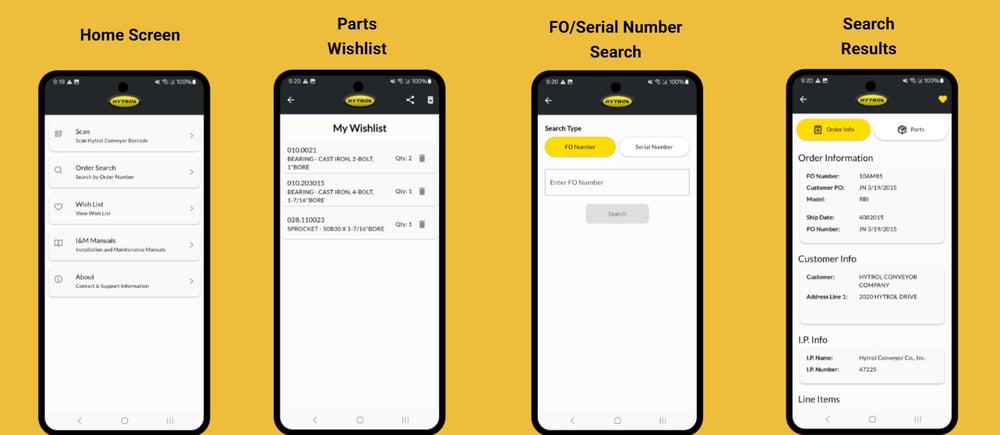
- Scan a QR code or enter a serial or Factory Order number to pull up details about your conveyor.
- View key specs like length, width, elevation, speed, belt type, zone lengths, and accessories.
- Browse spare parts, see how many your system uses, and view detailed part descriptions.
- Create a wish list of parts and email it directly to your purchaser, Integration Partner, or Hytrol.
- Access downloadable manuals and catalog pages for reference or training.
Getting around the app is easy:
- From the home screen, scan the QR code on the match mark sticker or type in your conveyor’s info.
- To see parts, tap the Parts tab—at the bottom of the screen on iOS, or the top on Android.
- Tap any part to get the details and add it to your email-ready list.
Ready to get started?
Download the latest version of the Hytrol Toolbox app from your preferred store: